
Changelog

Follow new updates and improvements to DailyPlaylists.

Launch of the New DailyPlaylists Professional Plan

We’ve officially launched the DailyPlaylists Professional Plan - a complete upgrade to the Artist Pro subscription with new features, a redesigned dashboard and clearer submission history.

🔧 What’s New:

  • Fully redesigned, streamlined dashboard

  • Playlist recommendation system

  • Transparent playlist matching score with breakdown

  • Reworked Track Explorer with improved feedback

  • New submission type that bypasses gates

  • Updated submission history interface

💳 Subscription & Billing Changes:

  • Artist Pro is now the Professional Plan

  • New pricing: from $14.99 to $19.99/month and $149.99 to $199.99/year

  • For annual subscribers: enjoy the Professional features at no cost, at time of renewal you will be charged the new pricing

⚙️ Transition Info for Current Users:

  • Click on the transition assets on your dashboard

  • After 6 months time, you will be automatically upgraded

  • Access your dashboard anytime to review your subscription status and explore the new features

We’ll continue to share updates and tips to help you get the most out of the new tools.

Thanks for being part of DailyPlaylists!

✨ New Features Walkthrough:

Overview Section:
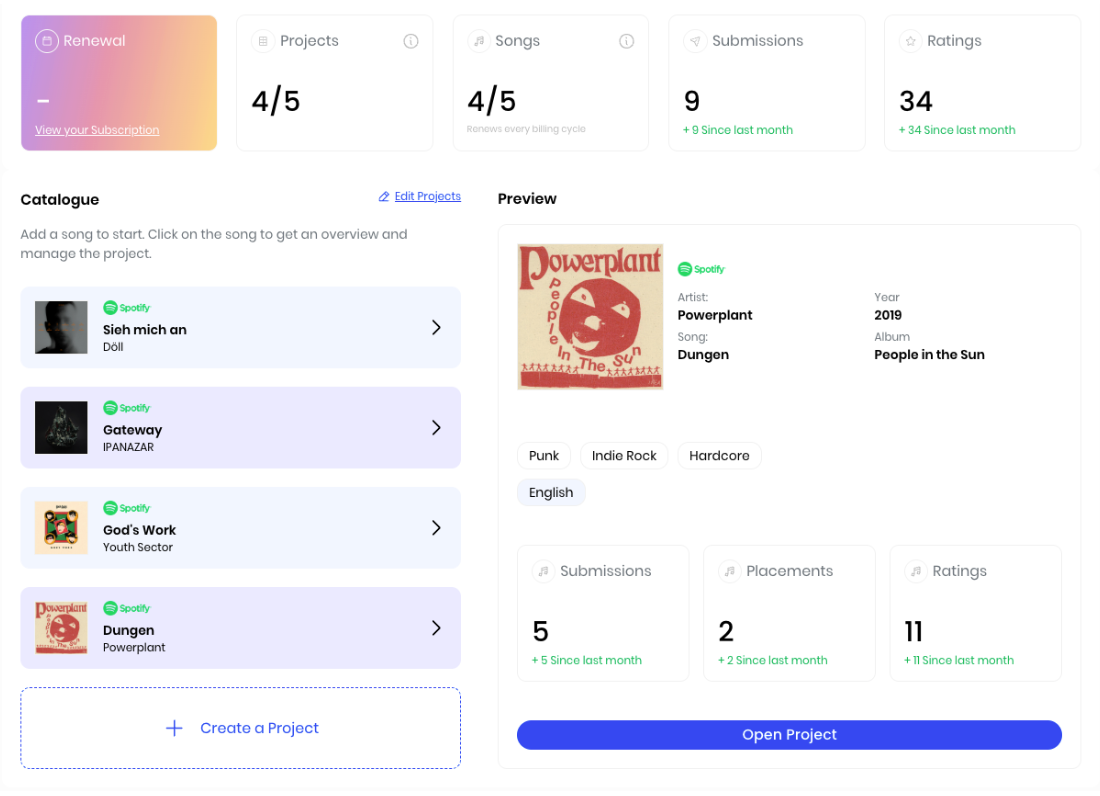
  • Renewal: The date when your subscription will be automatically renewed - if you cancelled the renewal of your subscription you will see a “-”.

  • Projects: These are the slots available to upload a song. 1 song = 1 project, inside each project you access the Professional tools that analyse your song and promotes it within our community. Subscribers can have 5 Projects active at once.

  • Songs: These are the amount of songs available to upload to a project. Every month you can upload a maximum of 5 songs into Projects, this number is refreshed every billing cycle.

  • Submissions: These are the total number of submissions made for the songs included in your projects, it counts all submission types.

  • Ratings: Formerly called "Feedback" from the Track Explorer - these are the ratings and comments received from our community over our Explorer section.

Catalogue Section:
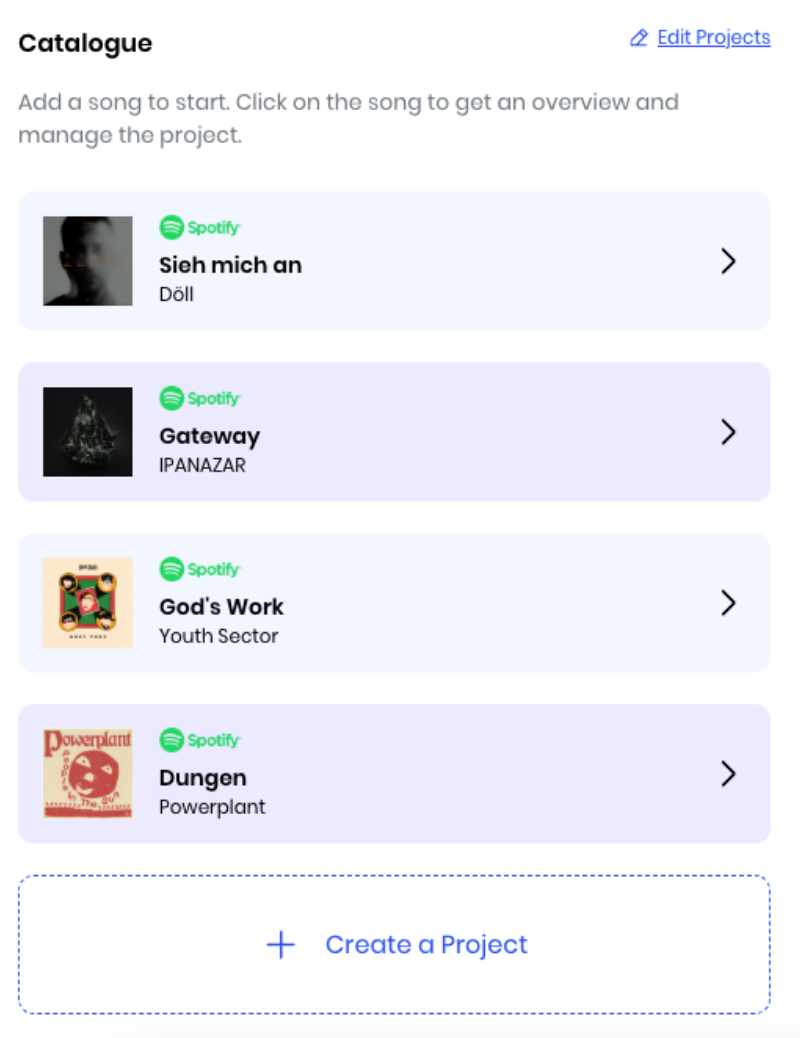
  • Project slots: 5 slots available to upload a song and start using the Professional tools. If you have available slots remaining, you will have a "Create a Project" button to upload a song. Active Projects will display the uploaded song with an arrow at the right, click on it to access the Project stats preview.

  • Edit Projects: Button to remove songs from Projects - located at the right of the Catalogue section title. Consider that when you remove a song from an Active Project, you don't recoup the Song slot - you can see how many Songs you have left to upload in the Overview section (Songs box).

Preview section:
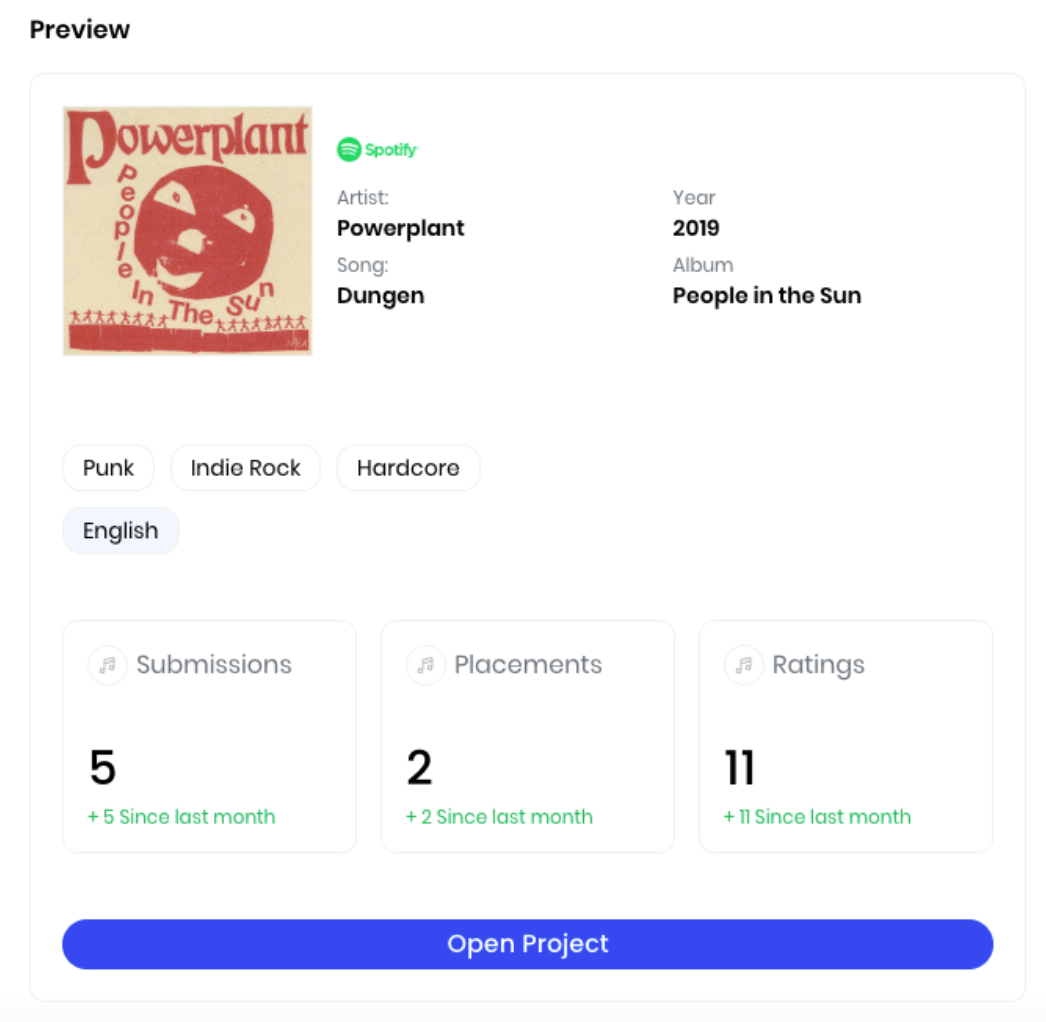
  • Spotify song & stats: General information from the song; such as a title, artist, release year and album.

  • Project stats: Stats selected by the artist when submitting the song to a Project; such as genres and languages.

  • Professional stats: Performance statistics about the selected project; such as submissions sent, playlist placements and total ratings received.

  • Open Project button: Button that will take you to the Professional tools to analyze and promote your song within DailyPlaylists.

Recommendations tab:

Recommendations Submission Type

  • In the Recommendations section you will find 5 playlists recommendations based on our matching system - every Monday you will get 5 new recommendations.

  • This type of submission does not execute any gates, so feel free to send your music to recommended playlists without having to save or follow any Spotify songs or profiles.

  • Submissions sent over Recommendations have a 7-day deadline for response versus 21-day deadline in the regular Standard Submission flow.

  • This type of submission is pinned in the curators dashboard so they can review and respond as a priority submission.
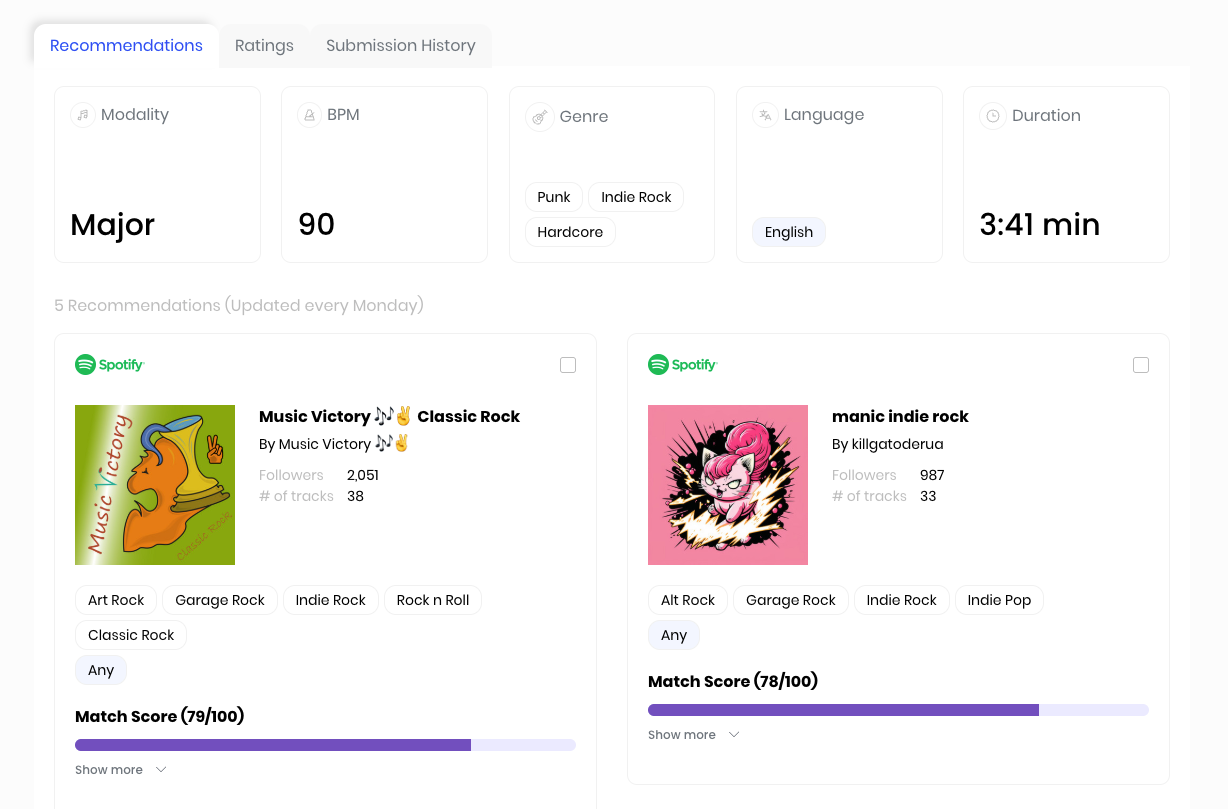
  • Song stats: General stats on the song analyzed, such as modality, BPM, genres, language and duration - these stats are used to find matching playlists.

  • Playlist Recommendations: You will see 5 playlist recommendations based on our matching system - every Monday you will have refreshed recommendations.

  • Playlist Stats: Within each playlist box you will find playlist general stats - a hyperlink text to the playlist and the curator, amount of followers, songs within the playlist, genres and languages for the playlist.

  • Matching Score: This is the matching score between your song and the recommended playlist - click on “show more” so you can see the breakdown of the score and the criteria used for matching.

Ratings tab:
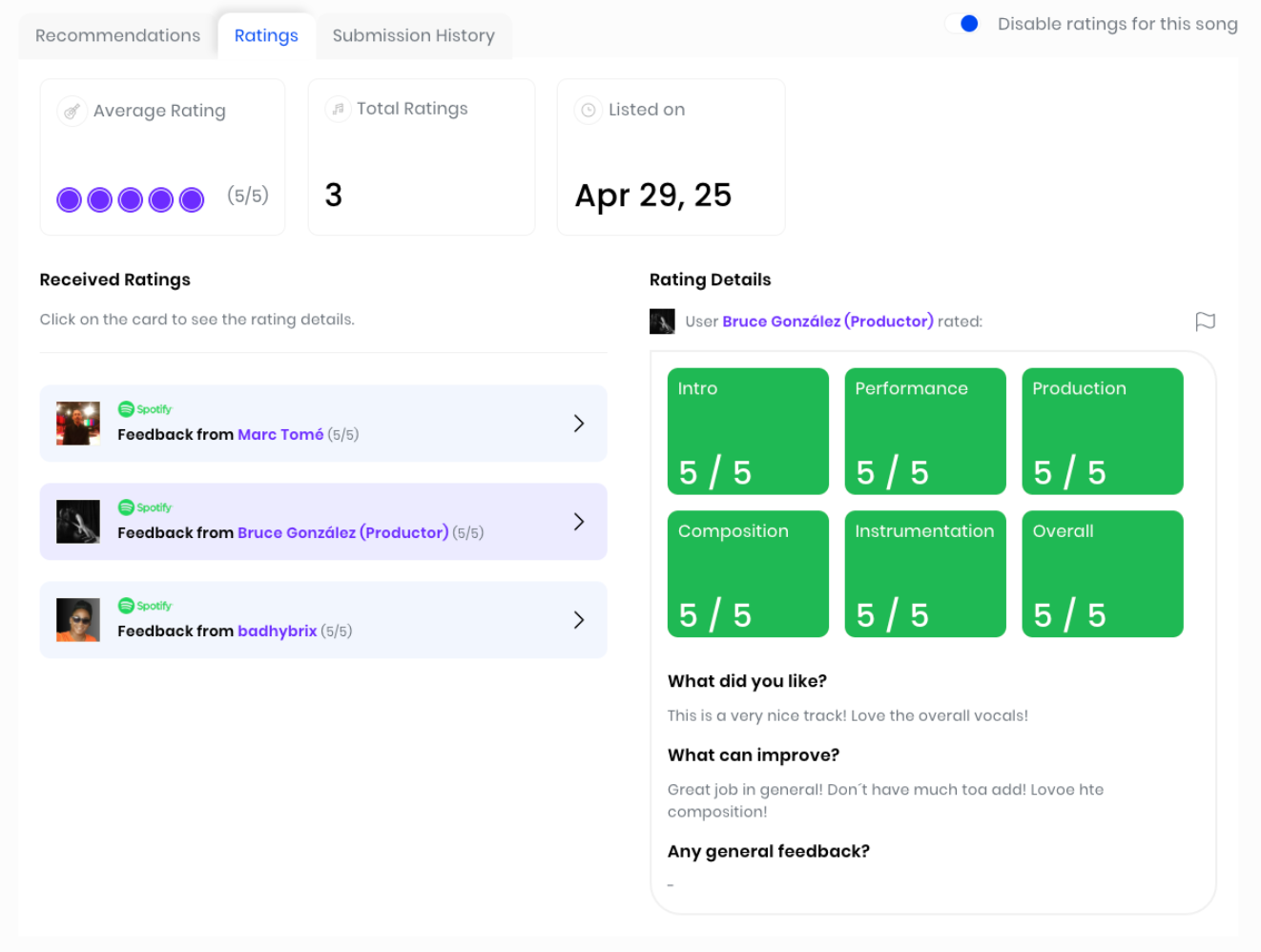
  • General Stats: Average rating, total ratings and date of song listing are displayed in this section.

  • Received Ratings: Here you will see all the individual ratings you received on a specific song, click on it so you can see the Rating Details.

  • Rating Details: Numeric score left by the selected user on different aspects of the song such as Intro, Performance, Production, etc. Here you will also find qualitative feedback on the song.

  • Disable Ratings Button: At the top right corner of the section, you can activate or deactivate your song’s listing to receive Ratings from the DP community.

Submission History tab:
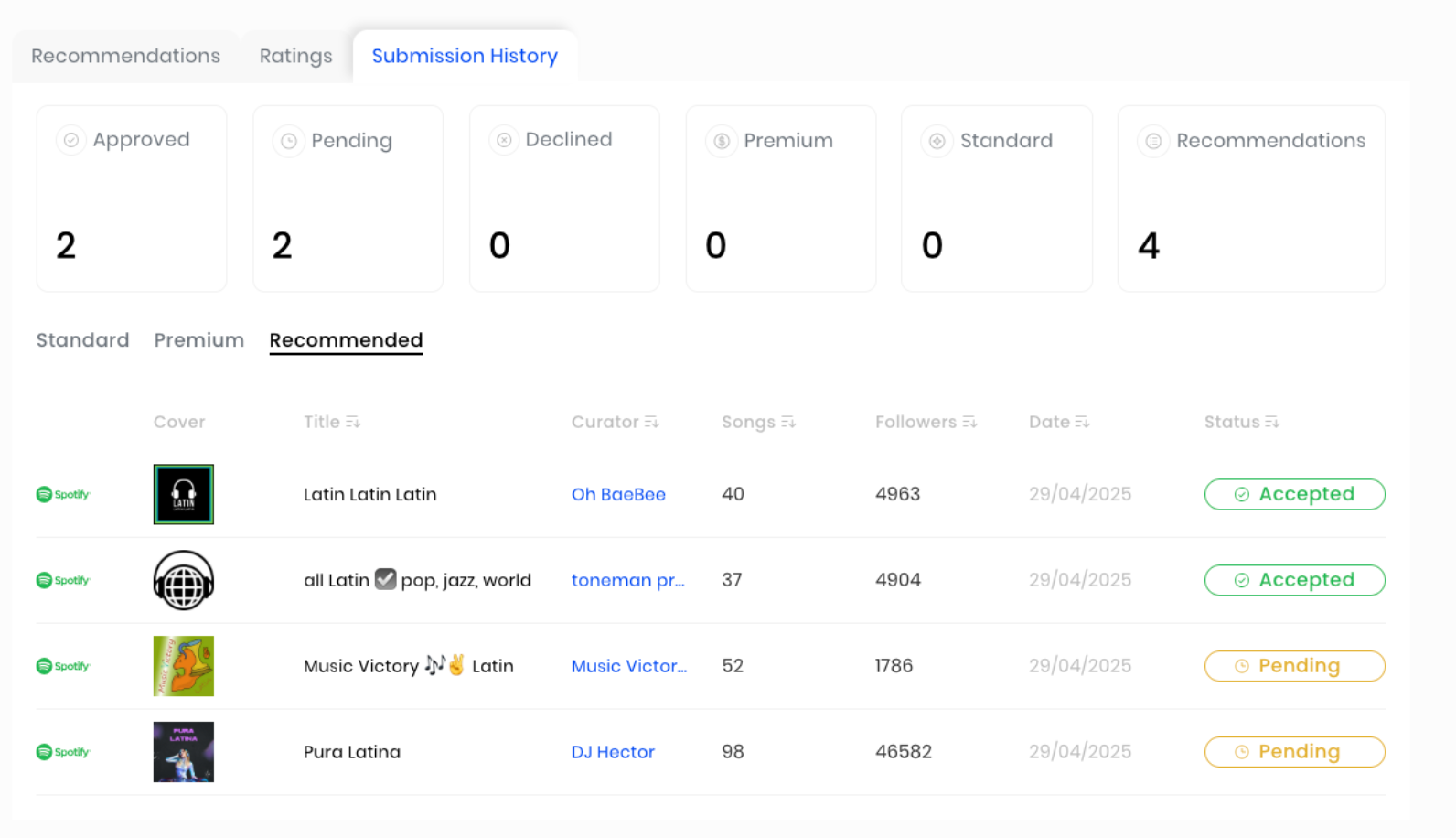
  • General Stats: Performance overview on all submissions sent - approvals, declines and pending, as well as total submissions divided by type.

  • Submission Type Selection: Sub-section tabs to select the submission details on each type of submission - Standard, Premium and Recommended.

  • Submission History: Details on each submission sent, with all general information on the playlist and the status of the submission.


Are you interested in trying out the new Professional plan? Click on the link below!

Remember that the first step to actually enjoy and use these features is to create your first project in the Professional dashboard - what are you waiting for? Start making the most of the DailyPlaylists experience.

TURN PROFESSIONAL

Improved

Introducing Our New Premium Curator Tier Update

We’re pleased to announce our latest update to the Premium Submission section of DailyPlaylists. 

This new system is designed to increase and reward Premium curator engagement, while increasing transparency to artists on who is most likely to review their submissions.

The Premium Curator Tier System is structured around five curator tiers. These tiers allow curators to earn more by reviewing Premium Submissions, with higher tiers unlocking greater payout rates and pricing options.

The tiers and requirements are as follows:

Key Features of the Update

  1. Premium Credit System for Earnings and Pricing
    Curators in the Premium program earn through a per-review credit system, with each credit tied to a split of the cost of the credit that increases based on the curator’s tier. Higher tiers also allow curators more control over their submission pricing:

    • Bronze and Silver: 1 credit per review.

    • Gold: Up to 2 credits per review.

    • Platinum: Up to 3 credits per review.

  2. Progression Tracking in the Curator Dashboard
    The dashboard now features a “Your Stats” tab, showing curators:

    • Their current tier and eligibility for the next level.

    • Metrics like total Standard and Premium Submissions reviewed.

    • Their Premium Response Rate, averaged over the last 3 months.

    • Tier benefits and requirements, including locked/unlocked tiers based on engagement.

  3. Artist Transparency Through Tier Badges
    Artists submitting music to curators will see tier badges on each curator’s profile. These badges provide quick insight into a curator’s engagement level and response rates, helping artists make informed decisions. Artists can also filter curators by tier, submission cost, and response rate.

  4. Tier Warnings for Engagement Maintenance
    Curators nearing the risk of dropping to a lower tier will receive a warning, with a 30-day period to meet the required engagement metrics to maintain their current tier.

  5. Tier Advancement
    Curators who meet the requirements to move up a tier will automatically be identified as their new tier. Better revenue split will be automatically applied to future submissions reviewed and curators will have to manually change their pricing on the new settings page

Benefits for Curators

This update provides curators with more control over their pricing, visibility, and earnings. By actively and consistently engaging with submissions, curators can progress through the tiers, achieving higher payouts and premium status. This system also encourages improved submission response rates, directly impacting the number of submissions and earnings potential.

Benefits for Artists

Artists now have enhanced tools to choose curators based on tier, response rate, and pricing, ensuring that they reach the most engaged and responsive curators. With greater transparency through tier badges and filters, artists can maximize the reach and effectiveness of their submissions.

This update is designed to benefit both curators and artists, enhancing the submission experience and supporting curators who are highly engaged on our platform. Check your stats today and see how you can maximize your progress and earnings with our new Premium Tier System.

CHECK YOUR NEW PREMIUM TIER

SUBMIT TO PREMIUM CURATORS

Improved

Introducing The New Track Explorer: Enhanced Feedback for Artists and Better User Experience

We’re thrilled to announce the brand new version of the Track Explorer, packed with updates to improve sharing feedback and to streamline the ability to earn Standard Submissions. 

The Track Explorer enables our Artist Pro community to receive constructive feedback on their work, while reviewers get rewarded for giving helpful insights. In this update, our goal is to increase tool usage, to improve the Artist Pro experience and to make the ability to earn submissions more streamlined.

Key Features in the new Track Explorer

1. Improved Song Listening and Feedback

  • Play Song Button: Users can now start listening to a track by clicking the new "Play Song" button.

  • Feedback Flow Timer: To ensure thorough listening, feedback will be unlocked only after a minimum of 59 seconds on desktop or 30 seconds on mobile. During this time, users will see a "Listening... Feedback will be unlocked after the preview" message. This also fixes the issues we had depending on the Spotify play history detection

  • Give Feedback Button: Once the listening period is completed, users will be able to access the "Give Feedback" button, creating a more intuitive and structured feedback experience.

2. Clear Feedback Status Indicators

  • Feedback Given Component: Tracks that have received feedback are now visually marked. This update makes it easier to see which songs a user has already reviewed, reducing confusion and helping users focus on new tracks in need of feedback.

  • Hide Reviewed Songs Toggle: Users now have the option to hide songs they’ve already reviewed. This filter helps users focus on new tracks, making feedback sessions more productive by removing any tracks they’ve previously interacted with.

3. Refined Feedback Interface and User Flow

  • Updated Feedback Screens: The feedback screens have been refreshed with the latest design updates, offering a more polished user experience.

  • Feedback Success Modal: After completing feedback, users will see a new success modal, acknowledging their contribution and giving a sense of completion.

  • New ‘Earned’ Tracker: To keep track of the Standard Submissions users receive for providing valuable feedback, we’ve introduced an "earned" tracker within the feedback flow and main page. This tracker displays accumulated rewards for active participation.

4. Thoughtful Design for a Cleaner Interface

  • Empty State Screen: We now require users to select a genre before diving in, meaning users will be able to find tracks within the genres they want to review. When no filters are selected, users will now see an empty state display. This design prevents clutter that we experienced on the old designs and keeps the interface clear when there are no songs that meet the selected criteria.

5. Improved Quality Control in Feedback

  • Disable Copy-Paste in Text Responses: To maintain the originality of responses, we’ve disabled the ability to copy and paste text in feedback fields, encouraging users to provide genuine, thoughtful feedback.

Explore the new Track Explorer today, and start earning Standard Submissions for your valuable feedback! Whether you’re an Artist Pro member seeking feedback, or a reviewer passionate about new music, there’s something new for everyone in this update!


VISIT THE NEW TRACK EXPLORER

Improved

Earlier updates